Parking management software
Software that runs your parking from the barrier to the invoice.
1Parking issues the ticket at the entrance, takes payment at the pay station, the desk or the driver's phone, opens the barrier at the exit and sends every receipt to myDATA. It runs on your own equipment, every day, without a cloud subscription.
Greek and EnglishOn your own server, not in the cloudmyDATA in real time
A visit
Four moments, no queue at the desk.
The system handles the entrance, the payment, the exit and the books. Staff step in only for the exceptions.
-
Entrance
The driver presses one button and takes a ticket, or the camera reads the plate. A subscriber taps a card. The barrier opens and the vacancy sign updates.
-
Payment
At the pay station with the ticket or the plate, at the desk with one key, or on the driver's phone without an app. By card, IRIS included.
-
Exit
Scan the ticket or tap the card and the barrier opens in about a second. Free stays leave without any payment at all.
-
Books
The receipt or invoice is issued the moment the customer pays, goes to myDATA and reaches the customer by email. Shift and daily reports are ready for the accountant.
What you sell
Tickets, passes and whatever else fits your parking.
Prices are rules, not a single number. Every zone, vehicle type, customer category and partner can have its own tariff.
Tickets
Free first minutes, stepped charges, a daily cap, night rates and holiday prices.
Learn morePasses
Monthly, fixed-length, entry packs and prepaid hours, with guaranteed spaces.
Learn more Optional moduleBookings
Spaces reserved for a specific date and time, with a code that opens the barrier.
Learn more Optional modulePartners
Hotels, shops and companies with their own tariff, validation and monthly billing.
Learn more Optional moduleExtra services
Car wash and other services charged together with the parking. The exit waits until they are paid.
Learn moreLess staff
The routine work happens without a cashier.
Your people deal with the exceptions, not with every car.
- Self-service pay station
- The driver scans the ticket or types three characters of the plate, pays by card and takes the receipt. A lost ticket is no problem: the system finds the car by its plate.
- Pay by phone
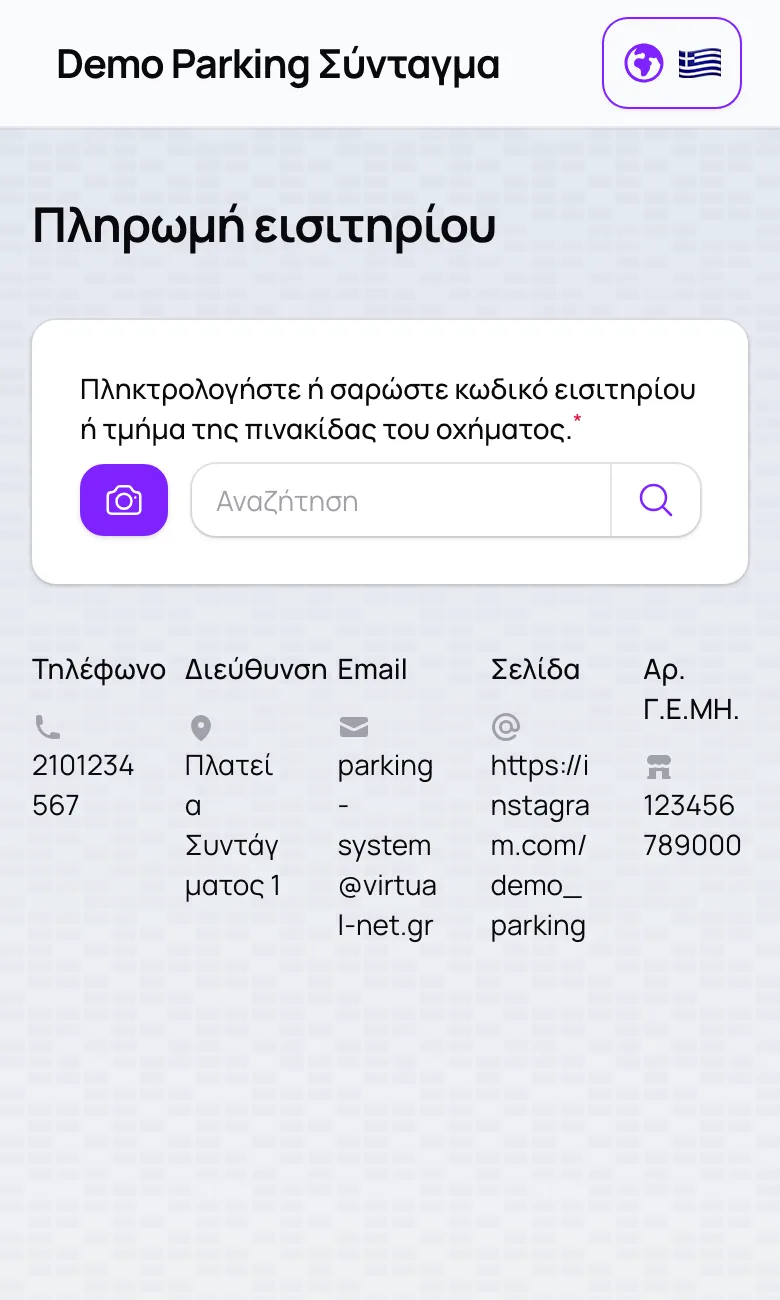
- No app and no account: scan the ticket with the phone camera, pay by card, get the receipt by email. Subscribers renew with one tap from the reminder email.
- Barriers from the office
- Open, hold or close any barrier from the office computer, with a mandatory reason that is logged. Issue or reprint a ticket at whichever lane you choose.
Reliability
Built to run every day, all day.
A parking does not close because a program froze. 1Parking is designed to stay up.
On your premises
It runs on a server at your site. Your data stays with you and you do not depend on a cloud subscription.
A second server on standby
Optionally, a second server watches the first and takes over automatically if it stops answering.
Daily backups
A copy of the database every day, with a check that it was really made.
A check every 5 minutes
Every terminal and camera is checked every five minutes. If something stops answering, you are alerted before your customers notice.
Accounting
Every sale becomes a document and every document reaches myDATA.
Receipts, invoices and credit notes are issued the moment the customer pays and transmitted to the tax authority immediately, with the MARK code and the QR printed on the receipt. If the connection drops, the receipt is still issued and sent as soon as it returns.
Connects to your accountant's software:
- Oxygen
- SoftOne
- Epsilon Net
- Pylon
- Entersoft
- Atlantis
Or daily files for any accountant, by email or to a folder of their choice.
In one installation alone
Proven in real traffic.
- 500,000+tickets
- 495,000+receipts sent to myDATA
- 9,000+passes
Figures from one customer installation in continuous operation since September 2023.
Good to know
How an installation works.
One installation, one business
As many zones as you need (floors, open and covered areas), each with its own capacity, hours and prices.
Your own server, not the cloud
The system is installed on your own machine at your premises. It is not sold as a cloud subscription.
Modules to order
Bookings, partners, spots, extra services and online payments are switched on per installation.
Greek and English
On every screen, for staff and for drivers.
Demo
See it for yourself.
Two demo installations are open online. Browse their public pages, or ask for a presentation to see the back office as well.
See 1Parking at work for your own parking.
Tell us about your spots, entrances and the equipment you already have, and we will propose a setup.